Skunks & Fellows: Automate Everything with n8n! | No-Code Workflow Magic
This Skunks and Fellows tutorial builds a complete n8n workflow from scratch, pulling Reddit posts, filtering them by keyword, and pushing the results into Notion pages automatically.
Automating a repetitive data task usually means either writing a full script or paying for a closed platform that limits what you can connect. n8n splits the difference: it's open-source, visual, and flexible enough to wire together APIs without writing much code at all. This Skunks and Fellows tutorial builds a complete, working example from an empty canvas: pulling Reddit posts, filtering them, and automatically creating pages in Notion.
Starting with a trigger node
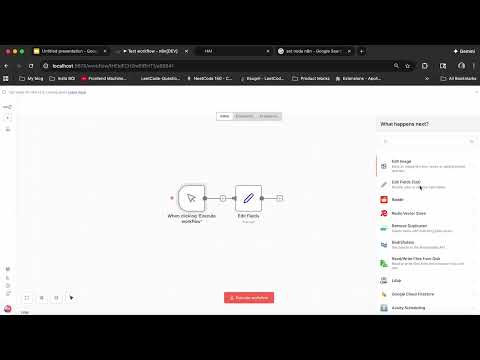
Every n8n workflow starts with a trigger node, the thing that kicks the rest of the workflow into motion. For testing, a manual trigger works fine, firing whenever you click "test workflow." For a live workflow, something like an RSS feed trigger fires automatically whenever a new item appears in a feed. Getting the trigger right first matters because everything downstream depends on it firing correctly.
Pulling posts from Reddit
The next node in the chain is a Reddit API call using "get many posts," which requires setting up Reddit OAuth credentials first. That setup is fairly simple: name the app, add a description and redirect URI, generate a client ID and secret, and connect and authorize the account. Once connected, the workflow can pull posts from a specific subreddit, in this case r/artificial, with a set limit (20 posts in the walkthrough) rather than returning everything at once.
Filtering with two conditions
Raw Reddit data comes back messy, some posts have empty fields that aren't useful. A filter node removes posts where the self text or title field is empty, catching cases where the field technically "exists" but is an empty string, which required using an "is not empty" string condition rather than just checking existence. In the example, that filter alone discarded seven of the twenty pulled posts. A second filter node narrows further by keyword, checking whether the title contains a specific term like "AI," which cut the remaining set down to four relevant posts.
Parsing the data with a code node
With the relevant posts isolated, a code node (writable in either Python or JavaScript) extracts just the fields actually needed, title, self text, and permalink, rather than passing along the full, bulky data table. The code node loops through every input item, builds a result array from the three needed fields, and returns that array. Returning the output as an array is called out specifically as the detail that has to be right for the node to work.
Pushing results into Notion
The final step sends the cleaned data somewhere useful: a new Notion page. That requires setting up a Notion integration (an internal integration created from Notion's own settings, generating a secret used as the API credential in n8n), then connecting that integration to a specific Notion page so the workflow has permission to write to it and its child pages. Inside n8n, a Notion "create page" node then uses the post title as the page title and adds content blocks, one for the self text and one for a formatted link back to the original Reddit post.
Running the finished workflow
Once wired end to end, running the workflow pulls the filtered posts and creates a corresponding Notion page automatically, with all four filtered posts appearing with their extracted information laid out clearly. Running it again reproduces the same result reliably, demonstrating a fully automated pipeline from a subreddit straight into an organized Notion workspace.
Key takeaways
- Every n8n workflow starts with a trigger node; manual triggers are useful for testing, while feed-based triggers automate the workflow entirely.
- Reddit's "get many posts" node requires setting up OAuth credentials through a Reddit-registered app first.
- Filter nodes can catch subtler issues than missing fields, like fields that technically exist but are empty strings.
- A code node (Python or JavaScript) can trim bulky API responses down to just the fields you actually need, and must return its result as an array.
- Notion integrations need to be explicitly connected to the target page before a workflow can write to it.
- The finished pipeline runs the entire process, fetch, filter, parse, and publish, without manually touching each step.
Who this is for
This tutorial is part of the Skunks & Fellows series from AI Skunkworks at Northeastern University and Humanitarians AI Fellows, aimed at anyone who wants practical, hands-on automation skills without needing to write a full application, useful for both business and personal workflow automation.
Full transcript(auto-generated, with timestamps)
[0:01]Hey everyone. In this tutorial, I'll show you how to automate Reddit post tracking using NAN. We'll fetch posts from a subreddit, filter them based on keywords, and automatically create notion pages all without writing a single line of code. Well, not a single line, like a few line, but that's completely unnecessary. And you we have other ways to do it also. So, let's dive in. As you can see, I have created a new workflow. Now, I will walk you through how to create a simple workflow uh and execute it. First, you want to include a trigger node. So, a trigger node is basically how you will trigger your
[0:45]Workflow and then the rest of the things will work. Rest of the nodes will work accordingly. So, I will just use a a manual trigger. So this will trigger whenever u I click on it or I click on the test workflow and this is just used for testing mostly used for testing otherwise you can use um triggers like RSS feed RSS feed trigger I'll just show you what you can use a node which is the RSS RSS feed trigger. So how this will be triggered is whenever there is a feed or the link which you have provided so that like it that will trigger this node.
[1:37]Okay. So with this I will add the next node which will um be executed after the trigger. and let's add a Reddit API. Okay. So, uh we're going to grab posts from Reddit and so for that we will take a get many posts. I already have my Reddit oath API set up but I can create new with this new credential and I can quickly show you how to create new one. So this is the one which I was which I had previously created. Making a new one is really uh easy. Just put a name web app simple description about URL and a redirect URI which you can find over
[2:38]Here. This is the redirect URI and then just I'm not a robot create app. So the second app is also created. This is the ID. So you paste the ID over here. That's the client ID. And for secrets, you get the secrets from this There you go. Then you say uh click on connect my account. You have to authorize uh from your Reddit allow and see connection successful. Now a new connection has been created. As you can see I'm this is the one which I created right now. Then uh we are looking for posts. We will get many sub ready. Let's get some info on
[3:37]Artificial intelligence. So, I'll just uh there's a sub called r/ artificial. I think so. Let's just get let's just only artificial. Yeah, this is the one which I want to grab the post from. So I will copy just the name of the sub not slash just the name put it over here. Then if we do return all, it will get too many posts. And we can put a limit. I'll just put 20 for now. And I think that's that's all there. We can test the step to execute it. See, and we have I think yeah, we got
[4:48]Like 20 different posts from Reddit. Okay. Okay. So now the problem is like there are some in some post some fields are empty and we don't need uh we not looking for posts where we have an empty field. So now to filter out these we can put a filter node. Okay. And filter node it's really simple here. You can put a value from the like the schema. So this is like the schema whatever you want to call this is a schema or a table or a JSON whichever format you prefer. So you just pick one of the like u parameters from the schema. So I would say self text and I want
[5:35]There to be a self text or I don't want the post. So I'll just say contains no it not contains it should be exists and I'll put another condition and that would be title wait title yeah and that would be similar would be exists yeah so if I test it Oh, wait. So, exist it actually exists, but it's empty. So, it's better if I put is is not empty and string is is not empty. Now, this should work. Wait. Okay. String is not empty. Let's test it. See, seven items got discarded in this. One of the two things must have been missing like either the
[6:44]Self text or the title. So now we have filtered a few items out of these. Now let's filter it further more because we can we might want to search post with a particular keyword. For that I'll put another filter here. Here I will look for um the title and I will look for a particular value in the title if it's there. So let's search for AI contains okay contains and AI. Now we can test step. So we now we have discarded nine items and we have kept four items. So all the titles which have the keyword AI will be extracted using this. Next let's write a simple code to parse the
[7:51]Uh data because as you can see over here there's like this is a huge data table with lots of information and we we are actually we are not actually looking for we are not actually looking for all these parameters. So it's better that we extract the ones which we need. For that we can just search for a function. Yeah. So we'll pick the code function. I like writing code in Python. You can also use JavaScript. I had written a simple code for this. There you go. So this is crucial that you return the value as an array. So I've initialized the array and for every item in the
[8:42]Input I'm taking the title self text and permanent link and appending it to the result and then I'm returning the output. Let's test it. And it runs once for all items. And let's see. So, we have the title, self text, and permal link. Perfect. That's how we want it. And for the four posts, we have for the four items. Now for the last step you want to output this somewhere like this to have for this to be a complete workflow. We start with the input where uh like working changing with the changing the input like parsing it extracting the crucial information. Now we want to output it
[9:38]Somewhere. So for that we can use uh we can uh post it in uh like a create a page in notion and put all the data in it. Let's go to notion then I'll create a new page. Add a page. Empty page. Right. Give it any name in a hen Reddit post. AI posts. Okay. Now you one thing you have to do is set up a um API from notion. So for that come down here go to connections click on manage connection
[10:54]Over here. Click on uh develop or manage integrations. Now I had already created one integration for testing. I'll create another one. The workspace just click on your account. Type internal. That's right. Click on save. Okay. Uh name is required. The name is N8. N 810 test 2 save. That will be enough. Then go to the configuration page. Show copy. Now let's go back to our workflow. In our workflow, we'll create the notion node. Now uh we want to create a page and um and input the items which we have right. So let's create a page for setting up the account. It's really simple. Create credentials.
[12:05]Enter the secret. We just copied that secret. Paste it here. Save. And you can just retry. Click on retry to check the connection. It's connected. We connected this with the second account. resources page operation is to create the page. Then we need a page URL. So for that let's go back to notion. This is the page we just created. Let's go down here to connections. Make sure always to add this connection to the page or your workflow won't be able to access this page. Have nent test will have access to this page and all the child pages. Continue. Yes, that's what we want. Then let's go back to our
[12:58]Okay, wait. Uh, we need to copy this page. So, let's go go to share, copy link, then at our in our workflow, paste the page URL. Okay. Now for title, I'll just use this title. Title of the post. Then we'll add a few blocks. So the type of blocks are like paragraphs. So for the first block the content will be the self text. Then for the second block the content will be the link. And to make it look better, we can just write link to page is ww.reddit.com/ you can just see a small preview how it will look like. That's correct. Now let's test it out.
[14:15]Execution. It's done. Let's go over to the page which we just created. As you can see, we have the four posts from Reddit filtered and crucial information extracted. It's pretty cool. You get all your info you need just by running the workflow. You get everything in your notion page and you get it like in a format like different pages for different posts. I can just run it once again to show you. You can see all of these working one by one. Then and that's it. Now you have a fully automated workflow that pulls relevant Reddit posts straight into notion. If you found this helpful, don't forget to
[15:05]Like, subscribe, and drop a comment if you have any questions. See you on the next one.
More from INFO7375 Branding & AI
 5:01
5:011 Getting Started n8n with HAILogo
 9:46
9:46Skunks & Fellows: Automating LinkedIn AI Posts in 5 Minutes with n8n | No-Code AI Workflow Tutorial
 10:00
10:00Building AI News Monitoring Agent with n8n & FastAPI | Mycroft | Nerd Stuff with Humanitarians AI
 2:58
2:58Madison: Build AI Agents for Marketing & Branding | OPT-Eligible Open Source Project
 4:51
4:513 - Datacleaning n8n
 6:49
6:49