Claude Skill Development: The File Is the Program
Building a Claude skill means writing instructions Claude reads, not code it runs. The video shows how the SKILL.md description triggers the skill, how Steps run top to bottom, and why nothing covers what the file leaves out.
Someone assumes that building a skill means writing code that Claude runs. The video says it does not. It means writing instructions that Claude reads. The video uses the skill for building skills, called skill-development, to show what a skill is made of and what that means for how it behaves.
A folder, not a program
A skill, as the video puts it, is a folder that Claude reads before it works. The skill-development skill holds a SKILL.md file of about 22 kilobytes and a references folder alongside it.
The SKILL.md is the whole instruction set. It is written in plain language with no hidden logic underneath. Claude reads the file and then acts on what it says, so the file is the program.
How a skill gets picked up
Two things have to happen before any of that runs. First, the SKILL.md carries a description stating when the skill applies. For skill-development, that covers wanting to create a skill, adding one to a plugin, writing a new one, improving a skill's description, organizing its content, or getting guidance on skill structure.
Second, when a request matches that description, Claude reads the file. The video leaves open how that matching works internally, and does not guess.
Steps run in order
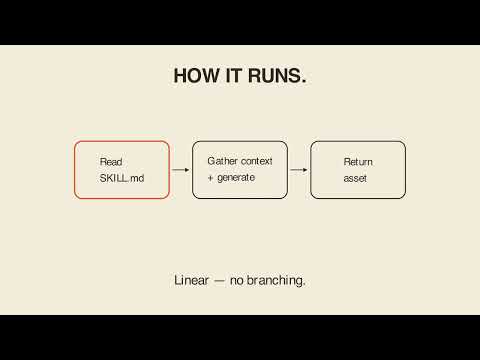
Once the file is read, Claude executes the Steps section in order, top to bottom. It is linear, with no branching unless a step says so.
Because these are plain instructions and not code, the skill runs the same way on the same request every time. It is repeatable rather than improvised.
The matching edge: only what is written
That reliability has an edge on the other side. Nothing hidden fills in for what the file does not cover. Ask for something the SKILL.md does not describe and there is no fallback logic underneath to catch you.
The file's words are the entire boundary of what happens. A skill is not code Claude runs. It is plain instructions Claude reads and follows itself, so it only ever does exactly what the words on the page say, nothing more and nothing hidden.
Key takeaways
- Building a skill means writing instructions Claude reads, not code Claude runs.
- A skill is a folder: a
SKILL.mdplus a references folder, in this example. - The
SKILL.mdis the whole instruction set, in plain language. - Its description states when the skill applies.
- Claude executes the Steps section top to bottom, with no branching unless a step says so.
- The same request gives the same behavior every time.
- Nothing covers what the file leaves out, so there is no fallback logic.
Try it yourself
Open Claude and paste this: I want to create a skill. Read the skill-development skill and walk me through what you will do before you do it. The video says that last clause matters, because having Claude explain itself before it acts is how you see the instructions it is following, not just the result. Try it on your own recurring task rather than the video's example.
Chapters
Full transcript(auto-generated, with timestamps)
The naive framing: "do I code a Skill?"
[0:00]Someone assumed building a skill means writing code, Claude runs. It doesn't. It means writing instructions Claude reads. So, how do I write a new skill for Claude? A skill is a folder Claude
A folder, not a program
[0:10]Reads before it works. This one is skill development, the skill for building skills. Inside a skill MD file about 22 kilobytes and a references folder alongside it. The skill MD is the whole instruction set written in plain language with no hidden logic underneath it. Claude reads the file then acts on what it says. The file is the program. Two things have to happen before any of that runs. First, the skill MD carries a description stating when it applies. For this skill, that's wanting to create a skill, add one to a plugin, write a new
How it gets picked up
[0:38]One, improve a skill's description, organize its content, or get guidance on skill structure. When a request matches that, Claude reads the file. Then it executes the steps section in order, top to bottom, linear, no branching unless a step says so. Because it's plain instructions and not code, skill development runs the same way on the same request every time, repeatable, not improvised. But that reliability has a matching edge. Nothing hidden fills in for what the file doesn't cover. Ask for something the skill MD doesn't describe and there's no fallback logic underneath it to catch you. The file's words are
Only what's written
[1:09]The entire boundary of what happens. A skill isn't code Claude runs, it's plain instructions Claude reads and follows itself. So, it only ever does exactly what the words on the page say, nothing more and nothing hidden. Your turn. Paste this into Claude. I want to create a skill. Read the skill development skill and walk me through what you will do before you do it. That clause matters. Having Claude explain itself first before it acts is how you actually see the instructions it's following, not just the result. The file
Carry-out
[1:37]Is the program. Lay 'em in for bear.
More from Extending Claude — Skills, Plugins & Connectors
 1:34
Claude Skills Fire by Description, Not by Name
 1:58
Claude Session Report: Claude Didn't Do the Counting
 1:40
Claude, Cowork Plugin Customizer.
 2:02
Claude Status Pages: Snapshot, Not Sensor — What Changed
 1:25
Creating An Asset Isn't One Generic Template.
 1:47