Claude, Crm Cleanup.
Claude does not tidy a CRM on its own initiative. This video explains the crm-cleanup skill, a SKILL.md file that scans HubSpot for exactly three kinds of problem, accepts an optional scope argument, and changes only what you approve.
The phrase "Claude, CRM cleanup" suggests that Claude decides for itself how to tidy up your customer records. The video corrects that. A skill called crm-cleanup scans for specific problems and then fixes what the owner approves, and nothing more.
Does Claude scan the CRM by itself?
The video opens with someone who typed the word "fix," as though Claude would repair a CRM alone. It does not. The crm-cleanup skill scans for stale deals, duplicate contacts, and missing fields, and the fixing step depends on approval from the person who owns the data.
A skill is a folder
A skill is a folder that Claude reads before it works. This one is crm-cleanup. The SKILL.md file inside holds the full instruction set in plain language, with no hidden logic. Claude reads it and then acts, which is why the video says the file is the program.
How the pipeline runs
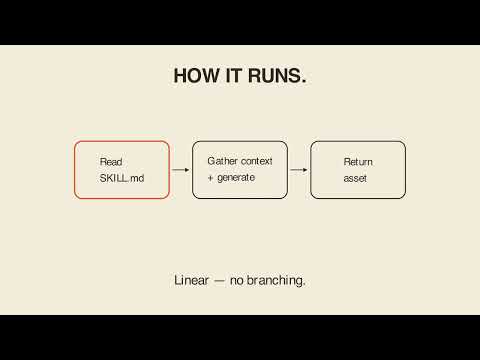
The pipeline sits in the Steps section of the file. Claude reads each step in order and then runs it. The path is linear, with no branching unless a step says so.
The three things it scans for
The scope is specific. The skill scans HubSpot for three things:
- stale deals
- duplicate contacts
- missing fields
It fixes only what the owner approves. You can narrow the work further with a scope argument, choosing deals, contacts, or all. Stay inside that request and the same input produces the same result every time.
What lies outside the file
Ask for anything the file does not cover and the skill has nothing to say about it. The video's conclusion is that Claude does not clean up your CRM however it wants. It scans for exactly what the file specifies, and it fixes only what you approve.
Key takeaways
- Claude does not independently decide how to clean a CRM.
- The crm-cleanup skill is a folder whose SKILL.md file holds the instructions.
- Claude reads the file, then follows the steps in order with no branching unless a step says so.
- The skill scans HubSpot for stale deals, duplicate contacts, and missing fields.
- An optional scope argument narrows the work to deals, contacts, or all.
- Fixes are made only for items the owner approves.
- Requests outside the file's scope are not covered by the skill.
Try it yourself
Paste the prompt from the video into Claude in a folder that has the skill: ask it to read the crm-cleanup skill, and before it fixes anything, to tell you exactly which stale deals, duplicate contacts, and missing fields it would flag in HubSpot, then wait for your approval on each one. The skill's code is in the humanitarians-youtube repository.
Chapters
Full transcript(auto-generated, with timestamps)
Cold open — does Claude scan my CRM by itself?
[0:00]Someone typed fix. Claude doesn't fix your CRM alone. A skill called CRM cleanup scans for stale deals, duplicate contacts, and missing fields, then fixes what you approve. Does Claude scan my CRM by itself? A skill is a folder
Anatomy — a skill is a folder
[0:14]Claude reads before it works. This one is CRM cleanup. The skill MD file holds the full instruction set in plain language, no hidden logic. Claude reads it then acts. The file is the program.
Pipeline — how the skill works
[0:26]The pipeline sits in the step section. Claude reads each step in order then runs it. Linear, no branching unless a step says so. The scope is specific. CRM cleanup scans
Mechanism — the interesting constraint
[0:36]HubSpot for three things: stale deals, duplicate contacts, and missing fields. It fixes only what the owner approves, and you can narrow it further with a scope argument: deals, contacts, or all. Stay inside that request and the same input produces the same result every time. Ask for anything the file doesn't cover and the skill has nothing to say about it. Claude doesn't clean up your
Carry-out
[0:55]CRM however it wants. It scans for exactly what the file specifies and fixes only what you approve. Your turn.
Your turn
[1:03]Here's the prompt. Read it with me. Read the CRM cleanup skill in this folder. Before you fix anything, tell me exactly which stale deals, duplicate contacts, and missing fields you'd flag in HubSpot, and wait for my approval on each one.
Outro
[1:16]Claude CRM cleanup. Lay 'em in for bear.